Send your W-9 or W-8 tax form
Find out which US tax form you owe, upload it from the Partner Portal or Partner Settings, and what the 1099-NEC means for US partners.
Before Tayon can pay you in US dollars, it needs a US tax form from you. This article tells you which one, how to send it, and what happens to it after that.
#Which form you need
| You are… | Form |
|---|---|
| In the United States | W-9 |
| Outside the US and paid in USD | W-8BEN as an individual, or W-8BEN-E as a company |
| Paid only in BRL — for example, a partner in Brazil | None |
If you need no form, you will not see Partner Settings in your menu or a tax-form panel in your portal.
#Send it from the Partner Portal
- Open the Payouts tab. The W-9 tax form or W-8 tax form panel explains what is needed, with links to the blank form on the IRS website.
- Download the form, fill it in and save it as a PDF.
- For a W-8, choose W-8BEN · Individual or W-8BEN-E · Entity.
- Choose the file, then Upload PDF.
#Send it from the Tayon app
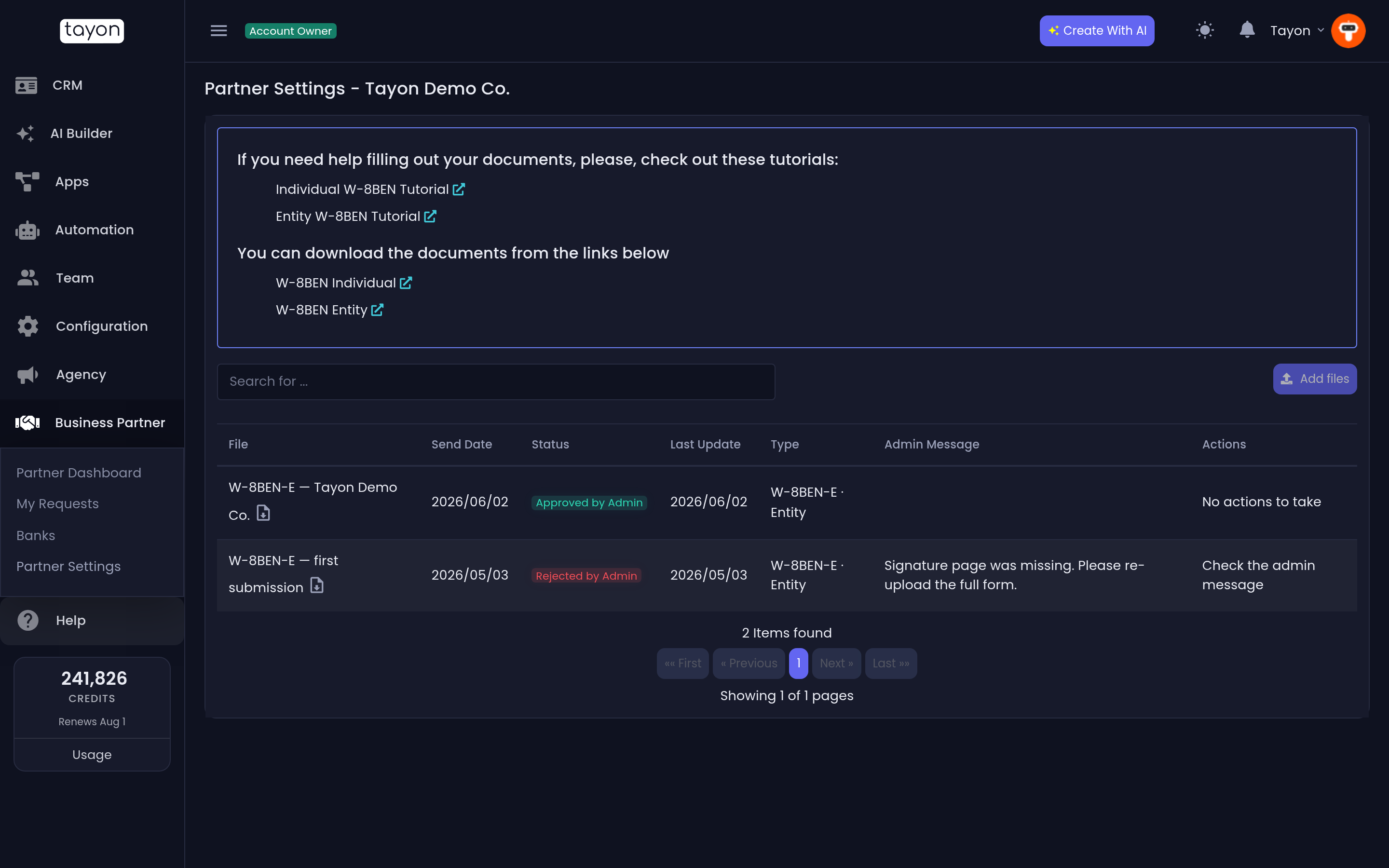
- Open Business Partner › Partner Settings.
- Download the blank form and fill it in. For a W-8, the links under You can download the documents from the links below open W-8BEN Individual and W-8BEN Entity on the IRS website. For a W-9, download it from the IRS website (irs.gov).
- Choose Add files.
- Under File type, pick W-9 (US person) — or Individual or Entity for a W-8.
- Add your PDF and choose Save.
The file must be a single PDF of 1 MB or less.
#After you send it
The Tayon team reviews your form, and you are emailed when its status changes.
| Partner Portal | Tayon app | What to do |
|---|---|---|
| Under review | Pending Approval | Nothing — wait for the review |
| Approved | Approved by Admin | Nothing — USD withdrawals are open |
| Rejected — please send a new one | Rejected by Admin | Read the reason, fix the form and send it again |
| Canceled | Cancelled by User | Send a new one |
| Not sent | — | Send your form |
In the app, the Admin Message column shows why a form was rejected. Add files stays greyed out while a form is pending or approved. To replace a form that is still pending, choose Cancel upload next to it and confirm.
#The 1099-NEC (US partners)
If you are a US partner, Tayon sends you a Form 1099-NEC for any year in which your payouts reach the IRS reporting threshold. The Payouts tab of your portal keeps a running total: Paid to you in 2026 by bank or Zelle, next to the threshold for that year. Once you pass it, it adds You will receive a Form 1099-NEC for this year.
Only payouts by bank transfer or Zelle count towards it. Payouts through PayPal or Payoneer are reported by that platform on its own form (Form 1099-K), so they are left out to avoid reporting the same money twice.
Updated: