Join the Partner Program
Turn on your partner account, get your partner link, and find your way around the Partner Dashboard.
probusinessYou’ll need: The account owner's login, on the Pro plan or above.
The Partner Program pays you a commission when businesses you refer become paying Tayon customers. This article gets your partner account switched on and shows you where everything lives once it is.
When you activate it yourself, the Partner Program screen states the terms: you earn a 25% commission on every payment made by customers you refer.
#Before you start
- Your plan. The Partner Program is available on the Pro plan and above. On a lower plan the Business Partner icon does not appear in the sidebar.
- Your login. Only the account owner can activate it. A team member, or a client account managed by an agency, cannot.
#Activate your partner account
- In the sidebar, choose the handshake icon, Business Partner.
- On the Partner Program screen, choose Activate my partner account.
- Confirm with Yes.
Tayon shows Your partner account is active! Share your link and start earning. and opens your Partner Dashboard.
Your partner link is created for you from your name. It is a web address of its own,
such as yourname.tayonpartners.com — or yourname.tayon.com.br if your account is
in Brazil.
#What is in the Business Partner menu
Once you are a partner, the Business Partner menu holds:
| Item | What it is for |
|---|---|
| Partner Dashboard | Your link, the accounts you referred, and your commissions |
| My Requests | Every withdrawal you have asked for, and where it stands |
| Banks | The accounts your commissions are paid into |
| Partner Settings | Your tax form. Only shown when you need to send one |
#Read your Partner Dashboard
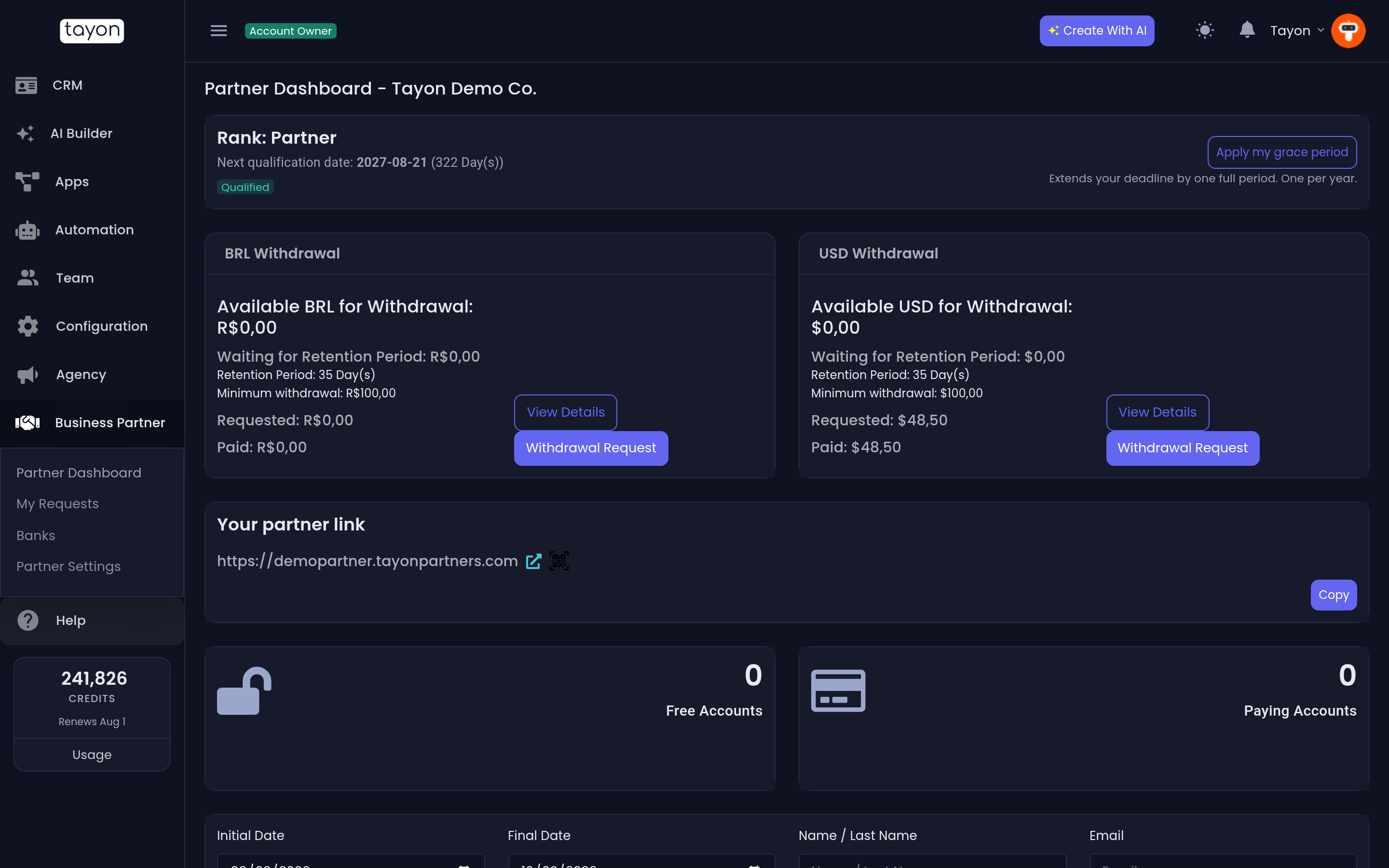
From top to bottom:
- Rank and Next qualification date — your standing in the programme. A Qualified badge means there is nothing to do. Action needed comes with a note saying what to do and by when, and Qualifying activity lists what has counted so far.
- USD Withdrawal and BRL Withdrawal — your balance in each currency, ready to withdraw. See Withdraw your commissions.
- Your partner link — choose Copy to copy it, or the QR code button (Generate QR Code) to get a code you can print or put on a slide.
- Free Accounts and Paying Accounts — how many people signed up through you, and how many of them pay. Click either box to see the list.
- The commission list — one row per commission, with the client’s name, plan, Register Date, Commission Date, Currency and Commission. A row marked Setup fee is your share of a client’s one-time setup fee rather than a monthly payment. Filter it by date, name, email or currency, then choose Filter.
#If something looks wrong
- There is no handshake icon, or the screen shows an upgrade notice. Your plan does not include the Partner Program. Upgrade to Pro or above, then try again.
- The dashboard says You do not have a registered link. Contact the Tayon team; they can create one for you.
- You were set up by the Tayon team rather than activating yourself. Your terms are the ones agreed with them, and they may also have sent you a private Partner Portal link.
Updated: