Run a survey without creating contacts
Turn on survey mode so answers are still recorded but nobody who responds lands in your CRM as a lead.
Not every conversational form is trying to find you customers. A satisfaction survey, an internal poll, a feedback form after an event — you want the answers, but you do not want fifty new contacts cluttering your pipeline.
Survey mode is the switch for that.
#What it changes
With survey mode on:
- Answers are still recorded, in full, and still show up on the Responses screen.
- No contact is created.
- No lead is created.
- Nothing lands in your CRM pipeline.
With it off, a visitor who gives an email or a phone number becomes a contact in your CRM the normal way.
That is the whole difference. Nothing else about the site changes — the same questions, the same branching, the same closing screen.
#Turn it on
- Open Conversational Forms and choose Responses on the site.
- At the top of the screen, turn on Survey mode.
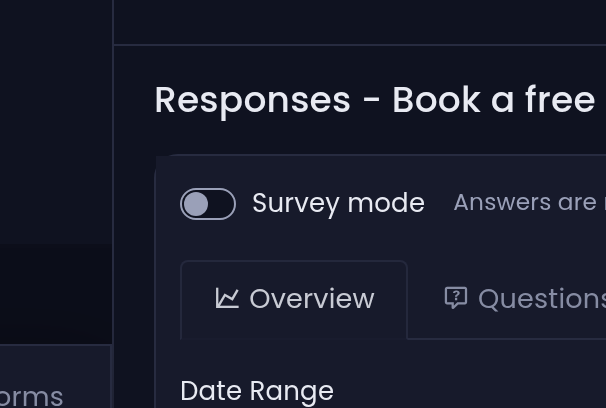
Tayon confirms with Survey mode is on — new responses will not create contacts. Turning it off again confirms the opposite: Survey mode is off — new responses will create contacts again.
The hint beside the switch says the same thing in one line: Answers are recorded, but no contact or lead is created in the CRM.
#It only applies from now on
The same is true in reverse. Turning survey mode off does not go back and create contacts for the people who answered while it was on. Their answers are on the Responses screen and that is where they stay.
#Decide before you share the link
Because the switch is not retroactive, set it before you send anyone to the site. The rule of thumb:
| You want | Survey mode |
|---|---|
| Leads you will follow up with | Off |
| Feedback, votes, research, an internal poll | On |
| Answers now, decide about follow-up later | Off — you can always ignore a contact, but you cannot invent one after the fact |
#Getting the answers out
Survey mode does not change how you read the results. The Responses screen works the same way, filters the same way, and Export to CSV gives you the same file. See See what people answered.
The one difference you will notice: with survey mode on, the Contact column reads Anonymous for every row, because there is no contact to link to.
Updated: