How a step is built
The three kinds of step on the canvas, and what a panel is really made of — a screen the visitor sees plus, optionally, one question.
Everything on the canvas is one of three things. Getting the difference clear saves a lot of confusion later.
| Step | Colour | Visitor sees it? |
|---|---|---|
| Panel | Blue | Yes — it is a screen. |
| Split | Purple | No — it chooses a branch. |
| Action | Orange | No — it does something behind the scenes. |
Only panels are visible. When a visitor answers a question, Tayon runs whatever splits and actions come next, one after another, until it reaches the next panel — and that is what appears. From the visitor’s side, the site simply moves from one question to the next.
#A panel is two things at once
This is the part that trips people up. A panel step carries:
- The screen — a template with your title, subtitle, body text, images and colours.
- The question — optional. A label and one input box, list of buttons, or upload control.
A panel can have a screen and no question. That is how you build a welcome screen or a thank-you screen: content, a Next button, no answer collected.
A panel cannot have two questions. One panel asks at most one thing. If you need a name and an email, that is two panels.
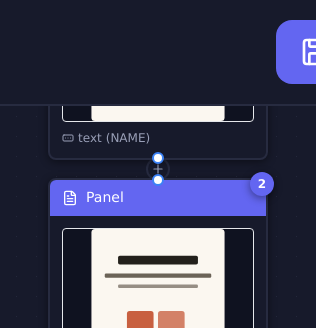
#The number in the circle
Every step carries a number in a circle. It is not decorative — it is how you refer to a step elsewhere. When you set up a Jump to Step action and have to pick a target from a list, the numbers in that list are the numbers on the canvas.
#Opening a step
Select a step and its properties open. What you get depends on the type:
- Panel — seven tabs covering the question, the layout, the wording, the colours, the images and the tracking. See The panel properties tabs.
- Action — a list of action types, then the settings for whichever one you pick. See Action types.
- Split — a condition, and a True branch and a False branch. See Branch with a split.
Editing a step and closing the properties is not enough on its own — use Save in the properties, then Save Flow, then Publish.
#How steps connect
Each step points at the one that follows it. A split is the exception: it has two outputs, True and False, and each one leads to its own chain of steps.
Where a chain simply ends, the flow ends. A visitor who reaches a panel with nothing after it has finished — which is why the last panel is usually a thank-you screen with no question on it.
#Building order that works
The order that causes least rework:
- Lay out the panels first — every screen, in sequence, with its question. Ignore branching and actions.
- Click through the shape and check it reads like a conversation.
- Add the splits where the path needs to fork.
- Add the actions last — save the lead, send the email, apply the tag.
Actions added early tend to end up on the wrong side of a branch you have not drawn yet. Panels first, branches second, actions last.
Updated: