Rebuild your site with another designer
Keep your brief and your address, and have the whole site written and drawn again by a different designer — or the same one — from the editor's Design menu.
You’ll need: A website built from a description by the AI Builder, open in the editor in its main language, and enough credits for a new build.
Every site the AI Builder makes from a description is drawn by one of Tayon’s 21 designers. If you like what the site says but not how it looks, you can have it rebuilt by another designer without starting a new project.
#Open the Design menu
- Open the site in the editor.
- Choose 🎨 Design ▾ in the toolbar.
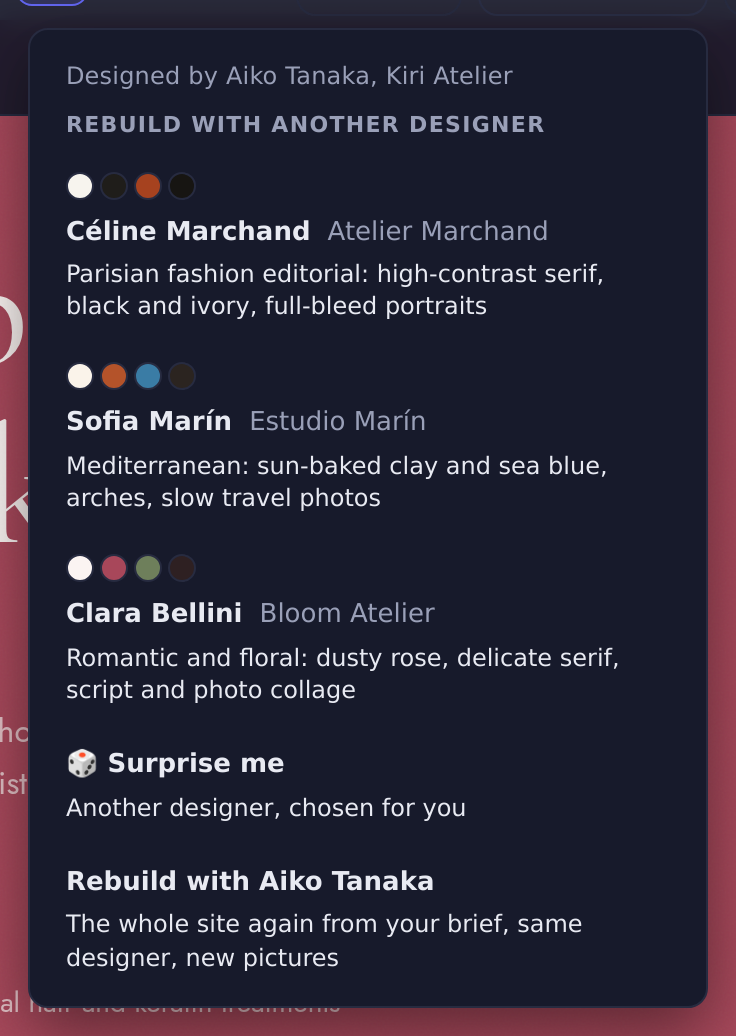
The menu shows:
- Designed by and the designer’s name and studio — for example Designed by Aiko Tanaka, Kiri Atelier.
- Rebuild with another designer — three designers suggested for your kind of business. Each card shows the designer’s name, their studio, one line about their style, and four colour swatches from their range.
- 🎲 Surprise me — another designer, chosen for you. It is never the one who drew the current site.
- Rebuild with and the current designer’s name — the same designer again, with new pictures and a new layout.
The three suggestions stay the same each time you open the menu on this site.
#Rebuild the site
- In 🎨 Design ▾, choose a designer card, 🎲 Surprise me, or Rebuild with the current designer.
- Read the confirmation. It names the designer and the estimated cost.
- Choose Rebuild.
The confirmation reads, for example: The whole site is written again from your brief by Aiko Tanaka, with new pictures, at the same address. It costs about 2,000 credits. Undo brings back the current site.
The editor then shows the build’s progress card, the same as for a new site — Planning the pictures…, Making picture 3 of 9…, Checking the design… — and opens the rebuilt site when it is done.
#What changes and what stays
| Changes | Stays |
|---|---|
| The words, rewritten from your original brief | The project and its name |
| The layout, colours and fonts | The site’s address |
| The pictures, made new for the new design | Your brief and the photos you attached |
| A published site stays published |
A published site keeps showing the old version to visitors until you press Republish, like after any other edit.
#What it costs
The confirmation gives the estimate: about 2,000 credits for the build. The pictures are charged on top, at 75 credits each, up to 9 for the home page. You need enough credits for the estimate before the rebuild starts.
#Go back to the old site
↶ Undo in the toolbar brings back the whole previous site in one step — pages, sections, pictures and design. If a rebuild fails or stalls, the old site is put back for you and the chat says it could not rebuild.
#Sites built in a set or a funnel
A website built together with a form or an agent, or as a funnel’s landing page, can be rebuilt too. Its brief comes from the set or the funnel it was built with. The rebuilt site keeps its wiring: its buttons still open the same form, and the agent’s chat bubble stays on the site.
#If you do not see the Design menu
- The site was not drawn by a designer. The menu only appears on sites the designers built — that is, sites built from a description since 30 October 2026. Older sites, and sites rebuilt from your files, screenshots or a picture of your design, do not have it. To try a designer, start a new site with New.
- You are editing a translation. Switch the language menu back to the main language.
- The button is greyed out. Another change is still running. Wait for it to finish.
If the chat says the site was not made from a conversation in the builder, there is no brief to rebuild from. Start a new site instead.
Updated: