Your account address on tayon.app
The address every site, form and chat link you publish lives under — how you choose it, the rules it follows, and what changes if you ever move it.
You’ll need: Administrator access. You are asked for an address the first time you publish a website.
Everything you publish — websites, conversational forms, chat links — lives under one address that belongs to your account:
{your account address}-{this item's name}.tayon.app
So an account called acme-salon publishing a website named booking ends up
at acme-salon-booking.tayon.app.
You choose the account half once. The second half you choose each time you publish something, and it only has to be unique inside your own account — nobody else’s names can collide with yours.
#Choosing it
You are asked the first time you publish a website. The prompt has two steps.
- Step 1 of 2 — Your account address. Tayon suggests one based on your business name. “Chosen once and used by every site and form you publish, so pick something you are happy to share.”
- Step 2 of 2 — This website’s name. For a form it reads This form’s name, and for a chat link This chat link’s name.
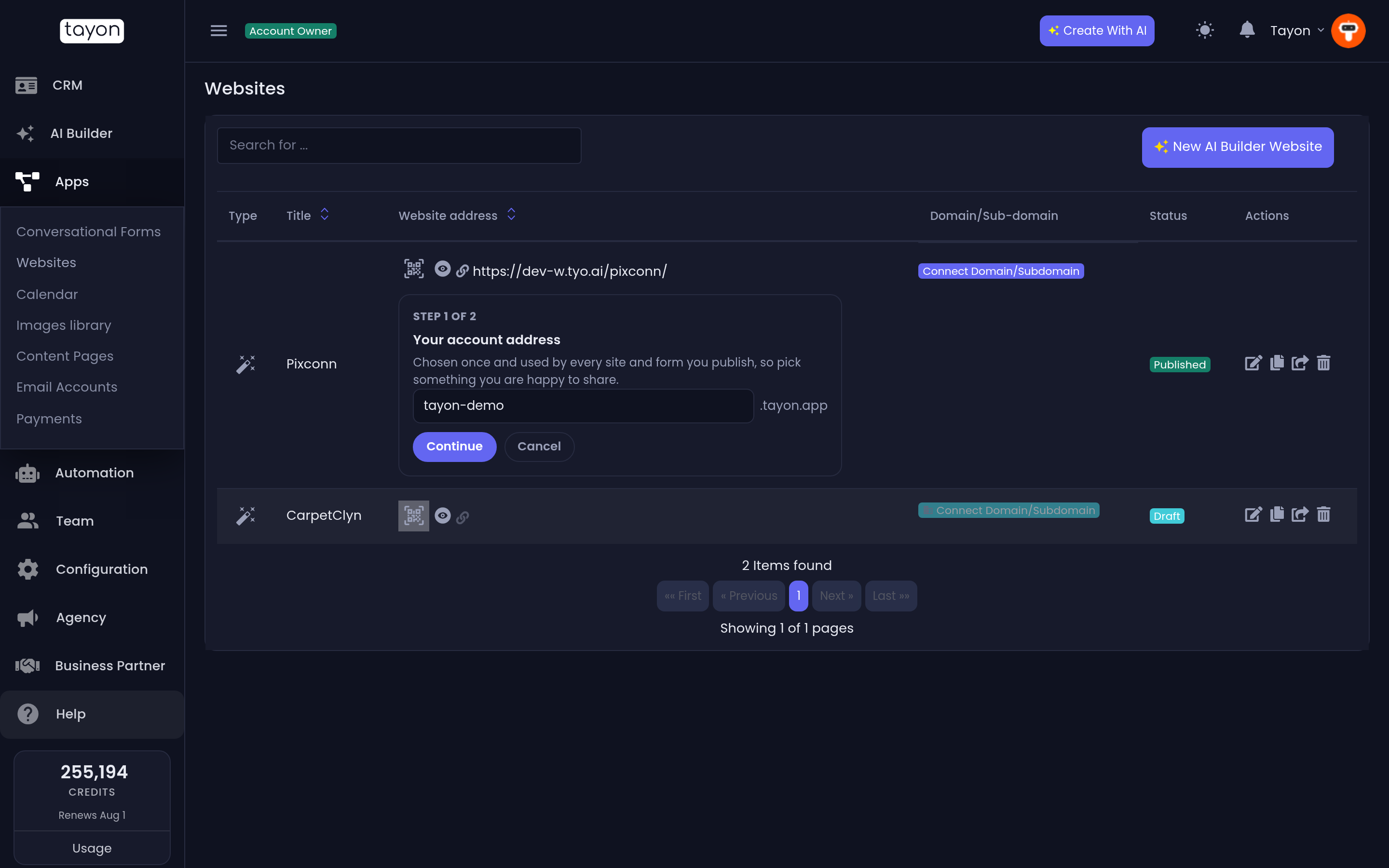
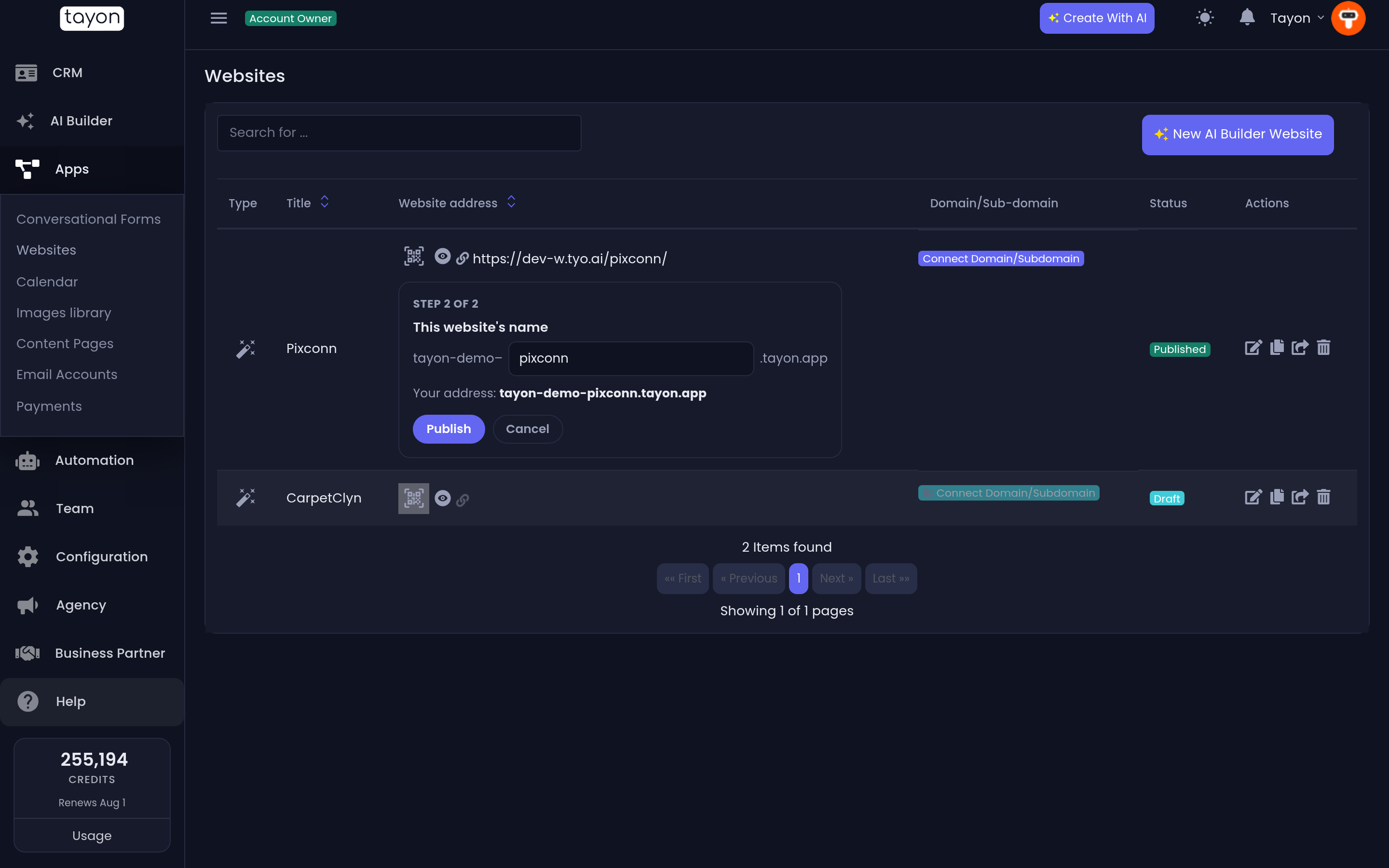
You are only asked for step 1 once ever. From then on, publishing anything else starts at step 2.
#What the name can be
| Length | 3–30 characters for the account address, up to 25 for the item name |
| Characters | lowercase letters, numbers and hyphens |
| Hyphens | allowed inside the name, not at either end, and never two in a row |
| Uniqueness | the account address is unique across all of Tayon; the item name only has to be unique within your account |
The limits exist because both halves have to fit inside a single piece of a web address, which the internet caps at 63 characters. If a name is taken or too long, Tayon says so and you pick another — nothing is published until the address is settled.
#When you are asked
An address is created the first time an item goes live, and never again.
| When it gets its address | |
|---|---|
| Website | The first time you publish it. Publishing stops until you have chosen an account address |
| Conversational form | When the form is created — a form has no separate publish button |
| Chat link | The first time you publish it |
Regenerating a conversational form rebuilds it in place and keeps its address — the link you have already shared goes on working. The same is true of republishing a website or a chat link: a republish never moves anything.
#Nothing that is already live moves
Sites and forms you published before all this keep the exact address they have. Tayon does not migrate anything, because the address people are already linking to would change underneath them.
Instead, anything already published gets its own publish button on the Websites, Conversational Forms and Bot Links lists, so you can move an item to a tayon.app address when you decide to — one item at a time.
#Using your own domain instead
Connecting a domain of your own still works exactly as before, and it wins: when an item has both, visitors get your domain.
The order Tayon uses is your own domain first, then your tayon.app address, then the built-in address the item started with. Both addresses stay live — connecting your own domain does not switch the tayon.app one off, and disconnecting it later simply falls back with nothing else for you to do.
#Changing your account address later
Change account address is on the same screen. Because the account half is baked into every address you have, changing it renames all of them at once.
Tayon tells you how many before you confirm: “Every address on your account changes — 6 in total. Your current address, acme-salon, keeps working so links you have already shared do not break.”
Change it rarely, and prefer your own domain for anything you are printing or handing out.
Updated: