Build a conversational form with AI
Turn a description into a working question-by-question page — branches, validation, notifications and lead capture included.
You’ll need: An account with credits available.
A conversational form asks one question at a time, branches on the answers, and turns the visitor into a lead. Building one with AI gets you the whole thing — every question, every branch, the notifications and the ending — published and ready to share.
#Start it
- On the start screen, tick Conversational Form and leave the description box empty.
- In the template gallery that opens, pick the card closest to what you want — or No template to describe it yourself.
- Say what kind of business it is for, or Skip.
- Describe what the page is for.
Picking a card does not give you a copy of somebody else’s flow. It tells the builder what you are trying to achieve, so the chat asks you fewer, better questions and the flow it generates is still written for you.
Whether you start from a card or from nothing, the welcome message asks for three things, and they are the three worth answering carefully:
- What it is for — capture leads, qualify prospects, collect reviews, route visitors to the right place.
- What you want to ask — the actual questions, in the order you want them.
- What should happen at the end — a thank-you, a redirect, a WhatsApp handover, an email to you.
Mention any alerts you want. “Email me whenever someone finishes” becomes a real notification step.
#Generate it
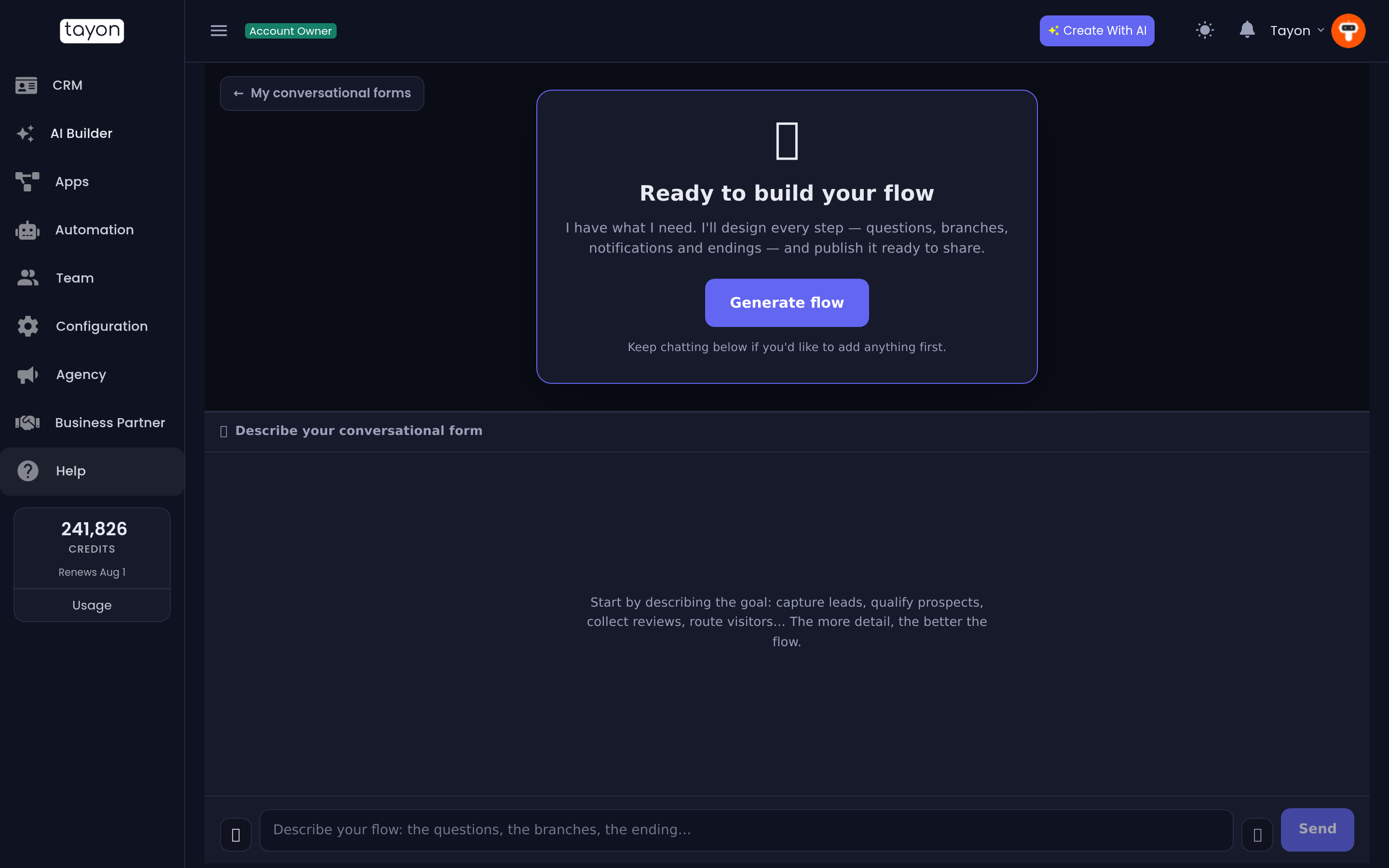
When the panel reads Ready to build your flow, choose Generate flow.
The progress card walks through three stages: Designing your flow…, Checking every path…, Publishing your flow…. It takes about a minute.
The middle stage is the one that matters. Before anything is published, every path through the flow is checked and repaired:
- Every branch reaches a real ending — no question leaves a visitor stranded.
- Both sides of every either/or are built, and the conditions match the answer options they test.
- Every typed question has a validation rule and an error message in the flow’s own language. Phone and email questions always use the built-in check, never a fixed pattern — see below.
- Somewhere on every path that collected a name, email or phone number, the lead actually gets saved.
- A redirect never fires straight off a data-entry question — the visitor gets a click-to-continue step first, so they can see their answers landed.
If a flow cannot be made to pass those checks, the build stops and you are not charged.
#How big a form can be
A form can have up to 120 steps, with branches nested up to 12 levels deep. That is room for a long application with several routes.
If it still comes out bigger, the form is not published and nothing is charged. Instead the chat asks what to cut: Your form came out with 134 steps and the limit is 120, so I haven’t published it. Tell me what to simplify… Answer in the chat — merge similar routes, drop optional questions, ask the common questions once for every route — or reply simplify it for me and the builder cuts what is least essential, keeping the questions that decide each route. Your answer rebuilds the form straight away. The same happens inside a set built together or a funnel.
#Phone and email questions
These always use their built-in check. The phone box formats and checks the
number for whichever country flag the visitor picks, so a fixed pattern such as
+55 (99) 99999-9999 would only reject valid numbers.
The flag a phone question opens on follows the form’s language: Portuguese opens on Brazil; Spanish opens on your account’s country if it is Spanish-speaking, otherwise Spain; any other language uses your account’s country. Visitors can pick another flag, and you can change the Default Country in the Flow Designer.
#After it builds
The panel becomes a live preview of the real page, with a toolbar over it.
| Control | What it does |
|---|---|
| 🖥 📱 | Preview at desktop, tablet and phone width |
| Copy link | The public address — share this |
| Open Flow Designer | Opens the flow for step-by-step editing |
| Regenerate flow | Rebuilds everything from the conversation |
| New flow | Starts a fresh project; this one stays in your list |
The chat locks once the flow is live — it reads Your flow is live. That is deliberate. Fine-tuning happens in the Flow Designer, where you can reorder, reword and rebranch a single step without touching the rest.
Answers people submit are listed against the flow in Conversational Forms, and the leads themselves land in your CRM.
#Regenerating
Regenerate flow re-opens the conversation so you can add what was missing, then rebuilds the whole flow.
#Where the form lives
A conversational form is live from the moment it is generated — there is no separate publish step — and it gets its address then, once and for good. If your account already has an account address, the form is served under it.
Regenerating rebuilds the form in place and keeps that address, so a link you have already shared goes on working.
After a flow is generated, the chat also offers a button to connect a domain or subdomain, so the page can live at an address of yours instead. Your own domain wins, and both addresses stay live.
#If the build fails
- Your form came out with … steps and the limit is 120 — answer the question in the chat, as described in How big a form can be.
- I couldn’t produce a flow that passes all quality checks means the branching you described could not be made safe. Describe the branches more simply — one decision at a time — and generate again.
- Anything else is a transient failure. Nothing was charged and nothing you typed was lost; adjust the chat and press Generate flow again.
Updated: