Connect Stripe or Mercado Pago
Store your gateway keys once, encrypted, so any conversational form you build can take payments without a credential ever going near a flow.
You’ll need: Account owner or administrator access, and an account with Stripe or Mercado Pago.
Before a conversational form can charge anyone, Tayon needs your gateway’s keys. A payment connection is where they live. You enter them once, they are encrypted, and from then on your flows refer to the connection by name.
ConfigurationPayment Connections
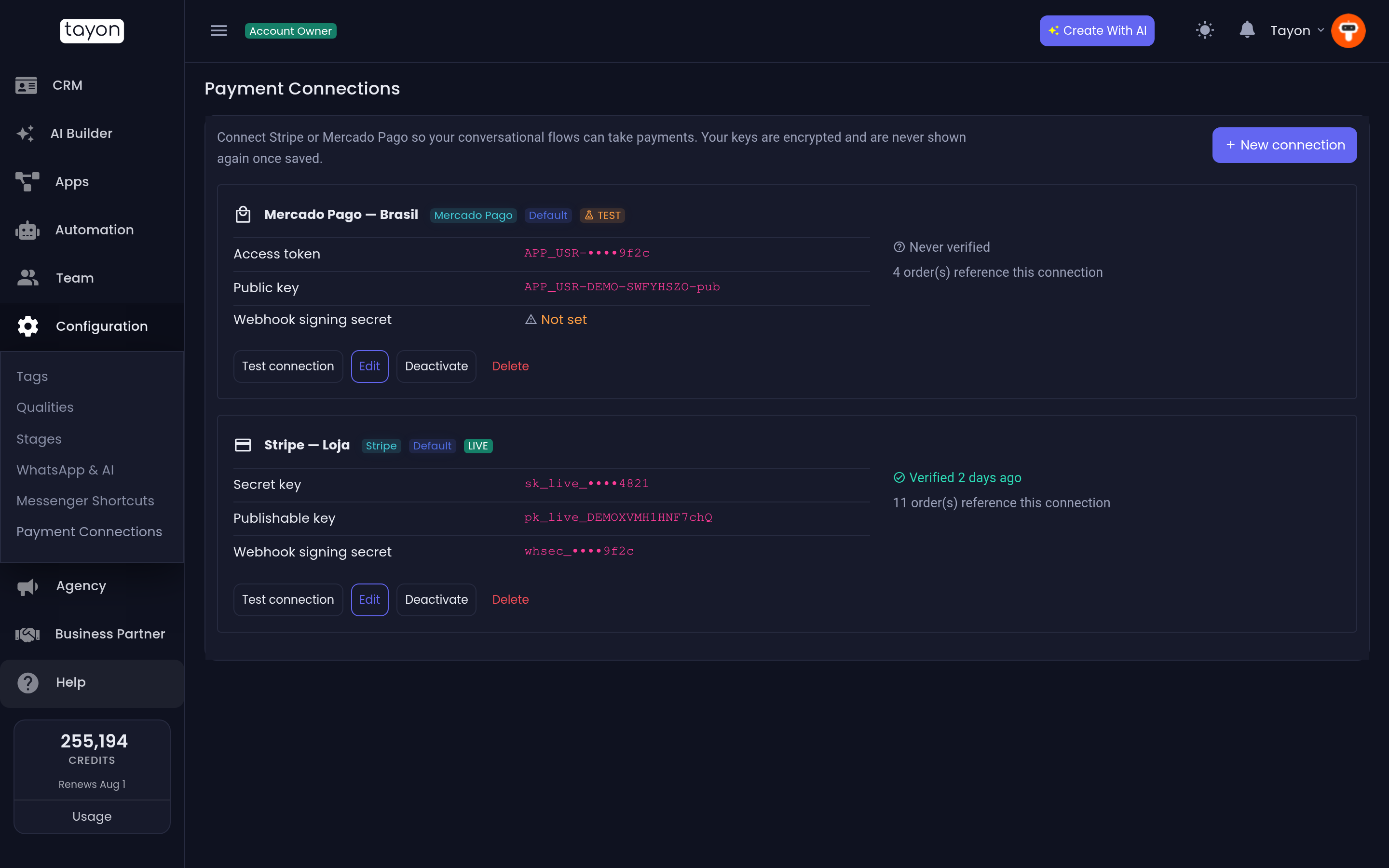
The screen says it plainly: “Connect Stripe or Mercado Pago so your conversational flows can take payments. Your keys are encrypted and are never shown again once saved.”
#Create a connection
- Choose New connection.
- Give it a name you will recognise in the Flow Designer — Stripe BR is a better name than Stripe.
- Pick the Gateway, Stripe or Mercado Pago.
- Pick the Mode, LIVE or TEST.
- Paste the credentials from your gateway dashboard.
- Save.
Stripe asks for a Secret key, a Publishable key and a Webhook signing secret. Mercado Pago asks for an Access token, a Public key and a Webhook signing secret. The webhook secret is the one you cannot have yet — see below.
Default currency is optional. Each payment step in a flow sets its own currency anyway.
#Your keys are gone as soon as you save them
That is also why an empty credential box when you Edit means keep what is there, not clear it. Type in a box only when you actually want to replace that key.
If a connection is badged Insecure — re-enter credentials, its keys were stored before encryption was in place. Open it and paste them in again.
#Register the webhook
The webhook is how Tayon finds out a payment really succeeded, rather than guessing from the buyer’s browser. Without it, card payments still resolve but PIX and boleto orders sit at Awaiting payment forever.
- Open the connection and copy the URL under Webhook.
- Paste it into your gateway dashboard — in Stripe, Developers → Webhooks → Add endpoint; in Mercado Pago, Your integrations → Webhooks, topic payment.
- Subscribe to the events the screen lists.
- Your gateway then gives you a signing secret. Come back, Edit the connection and paste it into Webhook signing secret.
Regenerate webhook URL exists for the case where the address has leaked.
#Test it before you sell anything
Test connection asks the gateway whether the keys work, and tells you which it is:
| What it says | What to do |
|---|---|
| Connection verified. | Nothing. The card shows Verified and when. |
| The gateway rejected these credentials | Check the key, and check that Mode matches the key’s own mode. A live key in a test connection fails here. |
| Could not reach the gateway | A problem on our side, not with your key. Try again shortly. |
| Too many attempts | Wait a minute. |
A connection that has never been tested shows Never verified. Test it before you publish a flow that depends on it.
#The badges on the list
| Badge | Meaning |
|---|---|
| Default | The connection a flow uses when it does not name one, for that gateway |
| TEST | Takes no real money |
| Inherited | Belongs to a parent account and is shown here read-only |
| Insecure — re-enter credentials | Stored before encryption; open it and re-enter the keys |
#Defaults
There is one default per gateway. The first connection you create for a gateway becomes the default whether or not you ticked the box, so a flow set to Account default always has something to resolve to.
You cannot untick the only default — you move it, by setting a different connection as default instead. Deleting the default promotes the oldest remaining connection.
#Edit, Deactivate, Delete
| Action | What happens |
|---|---|
| Edit | Change the name, mode, default flag, currency, or replace a credential. The gateway stays fixed. |
| Deactivate | Flows stop being able to use it, immediately. Its past payments stay on record. Activate reverses it. |
| Delete | Removes it. Past payments stay on record, but any live flow using it stops taking payments at once. |
Deleting a connection that orders refer to warns you how many, and makes you confirm.
#Your keys never enter a flow
A payment step in the Flow Designer stores a reference to a connection — never a key. That means you can duplicate a flow, hand it to a colleague, or export it, and no credential goes with it. Change a key here and every flow using the connection picks it up with no edits.
#Next
Updated: