See the payments you have taken
The Payments screen — every order your conversational forms created, what it was for, whether the money arrived, and what each status means.
You’ll need: A connected gateway and at least one flow with a Payment Checkout step.
Every time a visitor reaches a Payment Checkout step, an order is created — whether or not they go on to pay. The Payments screen is where all of them end up.
AppsPayments
It sits under Apps, next to your conversational forms, rather than under Configuration. This is operational data about the sites you built. The gateway keys are the settings part, and they live somewhere else.
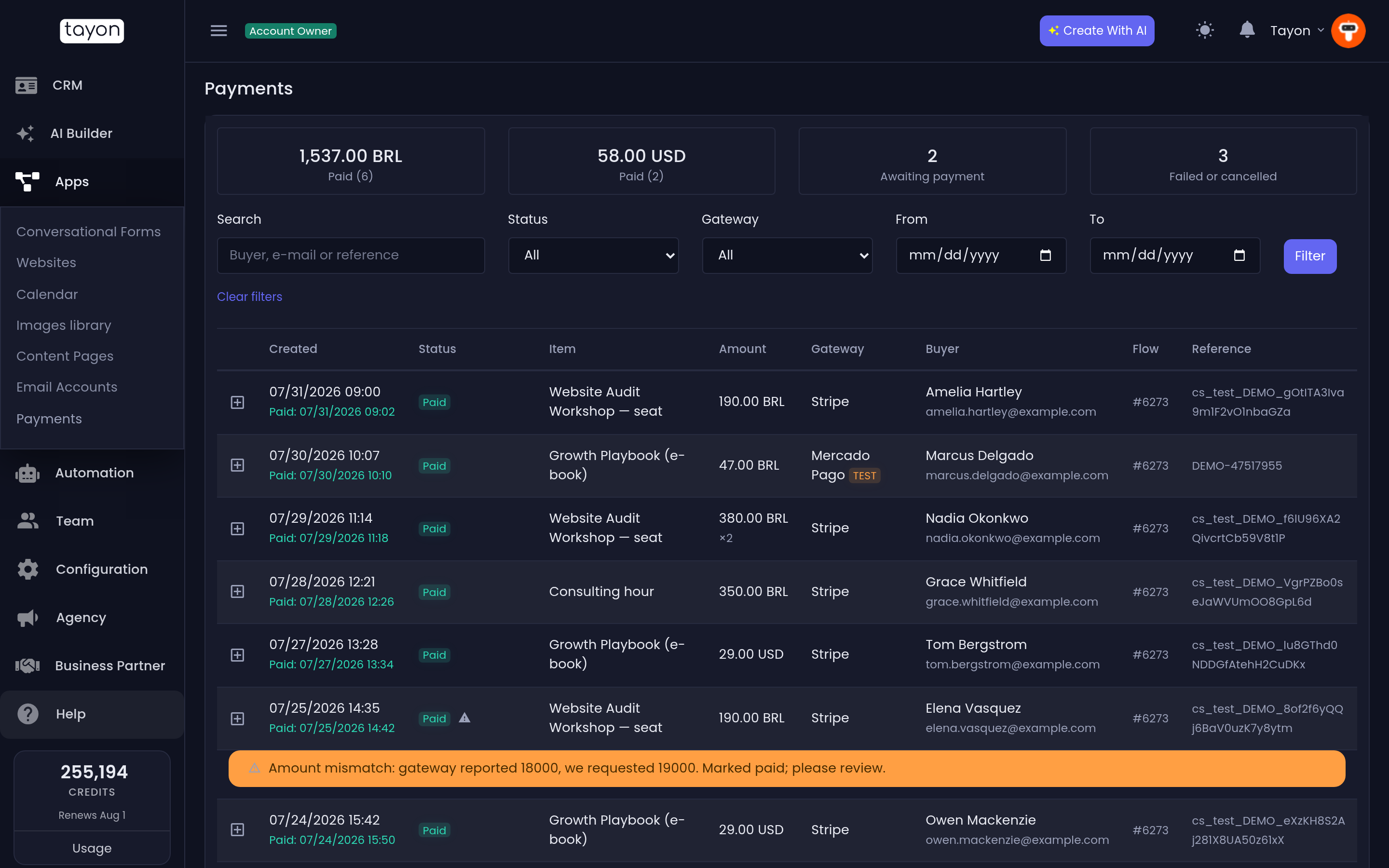
#The totals at the top
Three tiles summarise what you are looking at:
| Tile | What it counts |
|---|---|
| Paid | Money actually received, with the number of orders |
| Awaiting payment | Orders where the buyer has committed but the money has not settled |
| Failed or cancelled | Orders that ended without payment |
Paid is shown per currency, one tile each. Adding BRL to USD would give a number that is wrong in both, so it is never done.
#Finding an order
| Filter | What it does |
|---|---|
| Search | Matches the buyer’s name, e-mail or a reference |
| Status | All, Started, Awaiting payment, Paid, Failed, Cancelled, Expired, Replaced, Refunded |
| Gateway | All, Stripe, Mercado Pago |
| From / To | Limits the list to orders created between two dates |
Set what you want and choose Filter. Clear filters puts everything back. Long lists are paged.
#The columns
| Column | What it shows |
|---|---|
| Created | When the order was started, and underneath it Paid and the time, once it is |
| Status | Where the order got to |
| Item | What the buyer was paying for — the description from the payment step |
| Amount | The amount and its currency |
| Gateway | Stripe or Mercado Pago |
| Buyer | Who paid, as far as the flow collected it |
| Flow | Which conversational form took the payment |
| Reference | The order reference, and the gateway’s own reference |
Show payment events on a row opens what the gateway told us about that order, and when: each event, its result, where it came from — the gateway itself, the page the buyer returned to, or a later check — and whether it was applied.
That row of events is the answer to “did the gateway actually confirm this?”.
#What the statuses mean
| Status | Meaning |
|---|---|
| Started | The checkout was opened. The buyer may still be on the gateway’s page. |
| Awaiting payment | The buyer committed but the money has not settled yet. |
| Paid | Confirmed by the gateway. This is the only one that means money. |
| Failed | The gateway refused the payment. |
| Cancelled | The buyer abandoned the checkout. |
| Expired | The checkout link ran out before it was used. |
| Replaced | A newer order supersedes this one. |
| Refunded | The money was sent back. |
Two of these look like bugs and are not, which is why the screen carries a permanent legend explaining them:
- Awaiting payment is completely normal in Brazil. PIX and boleto settle after the buyer leaves the checkout page, so an order sits here until the gateway confirms it and then turns to Paid on its own. It can be minutes, or the next working day for a boleto.
- Replaced means the buyer went back and changed the quantity, so a new order took over from this one. Nothing went wrong and nobody was charged twice.
#Rows flagged for a look
Some orders carry a note in an amber row of their own, saying This payment needs a look. That means the gateway reported a different amount from the one we asked for. The order is still marked paid — refusing to acknowledge money that genuinely arrived would be worse — but somebody should check it, because it usually means the payment step’s amount changed between the buyer opening the checkout and paying.
#No gateway connected
If your account has no active connection, the screen leads with a warning and a Connect a gateway button. Your flows cannot take payments until you fix that, even if there are historical payments listed underneath.
The warning appears for deactivated and deleted connections too, not only for having none at all — either way, nothing is being collected right now.
If you are a team member without access to Configuration, you get the same warning asking you to speak to an account administrator, because the connections screen is not yours to open.
#This screen is a record, not a control panel
You cannot edit an order, mark one as paid, or force a re-check. Everything here is written by the payment process itself, and it is deliberately the only thing that can write it — that is what makes a status you read here trustworthy.
If an order is stuck at Awaiting payment far longer than it should be, the thing to check is the webhook on the connection, not the order. See Connect Stripe or Mercado Pago.
Updated: